Introduction Getting started
Get started
The Oxford Response private server API lets you read your server live and run it from your own website, bot or tool.
The old per-section endpoints (/v1/server/players, /v1/server/vehicles and the rest) stop working on 1 January 2027. If you use them, move to GET /v1/server before then. See Deprecated endpoints.
Not building something yourself? The Resources page lists free, widely used apps that already work with the API.
Every request needs your server's API key in the server-key header. Only the server owner can see it, in Server Management > External > API Key.
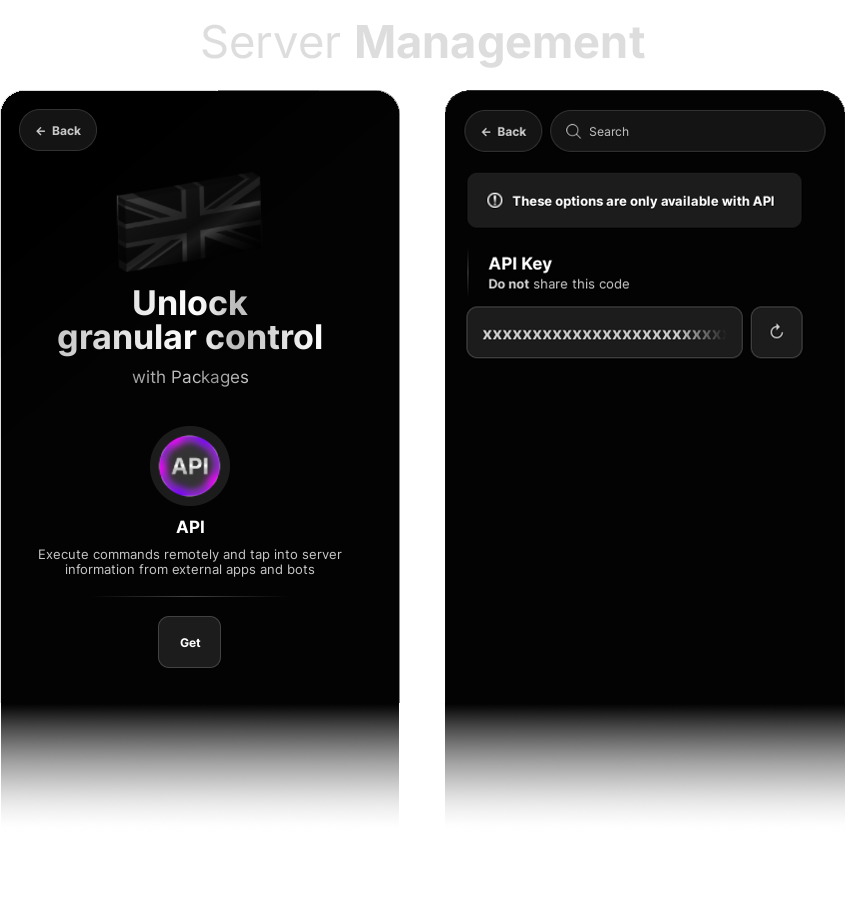
Your server needs the API package, which you can buy in the Packages area of Server Management.
With the key, read the API Reference for the endpoints and data, and Commands for everything you can do to your server.
curl "https://api.oxfd.re/v1/server?Players=true" \
  -H "server-key: $OXFD_SERVER_KEY"
const res = await fetch("https://api.oxfd.re/v1/server?Players=true", {
headers: {
"server-key": process.env.OXFD_SERVER_KEY,
},
});
const data = await res.json();import os, requests
res = requests.get(
"https://api.oxfd.re/v1/server",
params={"Players": "true"},
headers={
"server-key": os.environ["OXFD_SERVER_KEY"],
},
timeout=10,
)
data = res.json()Building an app that many servers will use? Ask Oxford Roleplay for an app key, which gives your app its own rate limits.
Introduction Getting started
What you can do
- Watch your server live, in one request: players (team, rank, position, health, custody, wanted level, what they're holding), every vehicle with its emergency lights and siren, second-by-second movement tracks, shots fired, the control room's incidents and units, robberies, fires, ambulance jobs, the weather and clock, the queue and more. It updates every second while you're using it, every 5 seconds otherwise.
- Read its history: kills, mod calls, radio calls, joins and leaves, about 100 kinds of game event, commands run in game, and the full audit log. Logs are kept when your server restarts and can be read while it's offline. One cursor gives you only what's new in all of them at once.
- Run it remotely: moderate, manage staff and groups, change any Server Management setting, dispatch control-room incidents, and more. Each command comes back with its result.
If you regenerate your API key in Server Management, the new key works straight away and the old one stops working within a few seconds.
API Reference Basics
Overview
One GET for everything about your server, one POST to run commands. Paths are relative to the base URL.
- Base URL
https://api.oxfd.re/v1- Format
- JSON, no envelope
- Data updates
- Every second while in use, otherwise 5
| Endpoint | What it does |
|---|---|
GET /v1/server | Everything you ask for in one response: live state, logs, shots, staff, bans, settings, the audit log. |
POST /v1/server/command | Runs one command or up to 10, and waits for the results. |
GET /v1/server/commands/{id} | One command's result. |
Deprecated /v1/server/* | The old endpoints, in their old shapes. They stop working on 1 January 2027: use GET /v1/server instead. |
API Reference Basics
Authentication
Send your server's API key with every request. The key alone decides which server you reach.
| Header | Type | Required | Description |
|---|---|---|---|
server-key | string | Required | The server's API key, from Server Management > External. |
Authorization | string | Optional | Bearer <app key>, only if you have an app key. |
App keys
An app used by many servers (a bot, a live map, a CAD) can have an app key from Oxford Roleplay; contact Oxford Roleplay to ask for one. It looks like oxa_ followed by 40 letters and numbers, and is shown to you once, so store it safely.
- Send it as
Authorization: Bearer oxa_…as well as theserver-keyof the server you're acting for. - It gives your app its own rate limits, shared across every server it calls, and says who is calling.
- An app key never reaches a server by itself. Your app can only reach a server whose owner has given it that server's key.
- No app key? Leave
Authorizationout altogether.
When it's refused
| Response | message | Why |
|---|---|---|
| 401 | Missing required header: server-key | No server key |
| 403 | Invalid API key | Not any server's key (mistyped, or regenerated) |
| 403 | This server does not have the API package | The server no longer has the API package |
| 401 | Invalid app key | Authorization was sent but isn't a known app key (mistyped, replaced or removed) |
| 403 | This app key is suspended | The app key is known but suspended |
Keeping keys safe
- A server key gives full control of the server: commands as the owner, settings, bans. Keep it on your own server or bot, never in website or app code people can read.
- If it leaks, regenerate it in Server Management > External.
- Header names aren't case-sensitive (
Server-Keyworks too).
API Reference Endpoints
Get server data
https://api.oxfd.re/v1/serverEverything, in one request
Add <Section>=true for each part you want. The top-level fields always come back; each section you ask for is added under its own name.
Choosing sections
true,1,yesor no value at all turn a section on;false,0ornoleave it out. Names aren't case-sensitive.- Prefer headers?
X-Include: Players,Vehicles,Eventsdoes the same, and so doX-Since,X-Limit,X-Offset,X-Audit-Before,X-Audit-CategoryandX-Audit-User. A query parameter wins over its header. - Unknown parameters and bad values are refused with
400, so a typo never quietly returns nothing. The body lists every valid parameter inValidParameters. - With no parameters at all,
GET /v1/serverreturns the old server information (see deprecated endpoints; those old fields go on 1 January 2027) plus the top-level fields below. Any parameter gets you the new shape.
The query parameters:
| Query parameter | Type | Required | Description |
|---|---|---|---|
<Section> | boolean | Optional | One per section you want, e.g. Players=true. See Sections. |
Since | integer | Optional | A Cursor from an earlier response. Only log entries and shots with a higher Seq come back. See Seq and Cursor. |
Limit | integer | Optional | Most entries per log and for Shots: default 100, max 500. Bans: default 100, max 1,000. Audit: max 100. |
Offset | integer | Optional | Skip this many bans (Bans). |
AuditBefore | integer | Optional | Audit entries numbered below this: pass the last response's Audit.Next. |
AuditCategory | string | Optional | One or more of Commands, Moderation, Settings, Staff, HelpRequests, Placeables, comma-separated. |
AuditUser | string | Optional | Only audit entries by this user: username (any case, @ optional) or user ID. |
Always returned
| Field | Type | Meaning |
|---|---|---|
Online | boolean | Whether the server is running. See Online and offline. |
LastHeartbeat | unix seconds | When the server last reported, or null if it never has |
NextHeartbeat | unix seconds | When the next report is due (1 or 5 seconds after the last, see Online and offline); null while offline |
Cursor | number | Pass it as Since next time. See Seq and Cursor. |
Server | object | The server's core details (below), the last known while offline |
| Server field | Meaning |
|---|---|
ServerId, Name, OwnerId | Who and what it is |
CurrentPlayers, MaxPlayers | How full it is |
Access | Listed (anyone), Code (with the join code) or StaffOnly |
JoinCode | The current join code |
Packages | E.g. ["API", "AdvancedServer", "RoleplayKit", "FleetKit"] |
StartedAt, Uptime | When this instance started (unix seconds); seconds it had been running at its last report. A new StartedAt or JobId means it restarted. |
PlaceVersion, JobId | The game version and the Roblox server instance |
CommandChannel | Whether it's listening for commands, e.g. Connected |
OwnerUsername, StyledName, Description, Tags, ThemeColour, Logo, CreatedAt, MatchmakingType, ApiVersion | The rest of its listing |
Response headers and 304
| Header | Meaning |
|---|---|
ETag | Send it back as If-None-Match; if nothing changed you get 304 Not Modified with no body. A 304 still counts towards rate limits. |
X-Status | online or offline |
X-Updated-At | When the server last reported (unix seconds) |
X-RateLimit-* | See Rate limits |
API Reference Basics
Conventions
- PascalCase field names everywhere (
UserId,SpeedMph). The exceptions are a few fields kept on old shapes, noted where they appear. null, never placeholders. Something unknown or absent isnull, not"None",0or"Unknown". Every player and vehicle has every field listed,nullwhere it doesn't apply.- Positions are
[x, y, z]in studs, rounded to 0.1. Headings are whole degrees, 0 to 359. - Times are unix seconds (UTC). Shots, tracks and radio use seconds with decimals.
- Units are in the name:
SpeedMph,TemperatureC,RangeStuds. - User IDs are numbers.
Usernameis the Roblox username;DisplayNamesays so. - Errors are
{ "message": "…" }with an HTTP error code. See Errors. - Paths are case-sensitive and have no trailing slash (
/v1/server/is a404). CORS is open, but never put a key in browser code. - New fields may be added at any time. Ignore fields you don't know.
API Reference Basics
Online and offline
A running server reports every 5 seconds, and every second for a minute after any request with its key, so while you're polling, live data is about a second old. It works with or without an app key; you don't have to do anything. It's offline straight away when it shuts down, or once it hasn't reported for 30 seconds. Offline isn't an error: Online is false, live sections are null, and everything else still answers.
| While offline | Sections |
|---|---|
null | Players, Tracks, Queue, Vehicles, Trailers, Placeables, PlaceablesSummary, Robberies, Atms, Incidents, Fires, Medical, Trees, TrafficLights, Doors, Radio, Jobs, Bounties, Economy |
| Last known | Server, World |
| From the server's saved record | Staff (with Online: false and Username: null), Groups, Teams (limits only), Settings, Audit |
| As stored | Every log, Bans, Catalogue, Shots (the last 10 minutes) |
| Refused | Commands: 503 with Code: "OFFLINE" |
A section the API can't read right now (the saved record can't be reached, say) is null; the rest of the response still comes back.
A server still running the previous game version (until it next restarts) sends less: Tracks, Placeables, Catalogue, Shots and the world sections are null, many player and vehicle fields are null, and commands are limited to 800 bytes.
API Reference Basics
Seq and Cursor
Every log entry and every shot has a Seq: a number that only goes up, shared by all logs on the server. Each response's Cursor is the highest Seq you can safely say you've seen.
- The first time, ask without
Since: you get the newestLimitentries of each log. - After that, pass the last
CursorasSince. Every log you ask for returns only entries with a higherSeq, newest first. - If one log has more than
Limitnew entries, you get the oldestLimitof them andCursorstops there, so the next request picks up the rest. Entries from other logs can then come again: skip any you've handled (keep the highestSeqyou've handled per log).
- Changed entries come again. An entry that changes (a mod call gets a responder or is resolved, a command gets its result, a shot gains its hit) gets a new, higher
Seqwith the sameId. Replace what you have byId. - Every entry has
Seq,Id,TypeandAt(unix seconds), then its own fields. TreatIdas an opaque string. - Logs survive restarts. How many of each are kept is in Sections.
API Reference Sections
Sections
Ask for any combination
| Section | What it returns | Offline |
|---|---|---|
| Live | ||
Players | Everyone in the server: team, rank, position, location, health, custody, wanted, vehicle, what they're holding, unit status | null |
Tracks | Each player's and vehicle's position every second since the last report | null |
Vehicles | Every vehicle out: emergency lights and siren, speed, occupants, lights, fuel, tyres, damage, livery | null |
World | Weather, temperature, clock, locks, night, snow, speed limit, sticky message, countdown | Last known |
Teams | Players, limits and group locks per team | Limits only |
Queue | Who's waiting to join, in order | null |
Robberies, Atms | Robbery sites and ATMs: state, alarm, robbers | null |
Incidents | The control room: open incidents, units, operators, timeline | null |
Fires, Medical, Trees, TrafficLights, Doors, Radio, Jobs, Bounties, Economy, Trailers, Placeables, PlaceablesSummary | The rest of the world | null |
| Server | ||
Staff, Groups | Staff with their ranks and who's online; the server's groups and members | From the record |
Bans | The ban list, paged with Limit and Offset | Stored |
Settings | Every Server Management setting | From the record |
Catalogue | Game data that changes only with an update: map, places, weapons, vehicles, offences, teams and ranks | Stored |
Logs (take Since and Limit) | ||
KillLogs | Kills (downs), with both positions and the part hit. Last 500. | Stored |
ModCalls | Help requests, responders, resolved. Last 300. | Stored |
RadioCalls | Radio calls. Last 500. | Stored |
JoinLogs | Joins and leaves. Last 500. | Stored |
Events | About 100 kinds of game event. Last 1,000. | Stored |
CommandLogs | The newest audit log entries. Last 100. | Stored |
CommandResults | Commands sent through the API and how they went. Last 200. | Stored |
Shots | Every shot: who, weapon, from, to, what it hit | Last 10 minutes |
Audit | The full audit log, paged. Ask only when you need it: it's slower than the rest. | From the record |
API Reference Sections
Players
/v1/server?Players=true| Field | Values |
|---|---|
Team, Callsign | Team name (Civilian, Police, Ambulance, Highways, Fire, Jailed); callsign or null |
Rank, RankId | Their staff rank on this server (Owner/owner for the owner), or null |
Position, Heading | [x, y, z]; degrees. null before they've spawned. |
Location | { Road, Area, Grid, Address }: nearest road, nearest named place, map grid square (a letter for x, a number for z) and nearest house. Any can be null. |
Health, MaxHealth | Whole numbers |
Downed, DownedCall | On the floor; and whether they've called for help |
Tased, Invincible | true or false |
Custody | { By, Mode, DeadlineAt, StaffCustody } while detained: the officer, how they're held (e.g. Walking, Seated), when they'll be jailed automatically, and whether it's staff cuffs. Otherwise null. |
Wanted | { Level, EndsAt, Paused, Offences }: level 1 to 3, when it runs out (null while paused), the offences. null when not wanted. |
Jailed | { EndsAt } in jail, otherwise null |
Vehicle | { Plate, Seat, Owner } for the vehicle they're sitting in (seat: Driver, FrontPassenger, RearLeft, RearRight, Rear; Owner: it's theirs). Their own car is in Vehicles by OwnerId. |
Holding | { Item, Aiming, Ammo, Spare } for the tool in their hand (ammo for guns with limited ammo). null when empty-handed or seated. |
Stance | Standing, Running, Crouching or Ragdolled; null when seated |
Unit | Emergency teams: { Status, IncidentId, ControlOperator }, their control-room status (e.g. Available, En route, With prisoner, Down, On Control) |
Carrying, Job | A carried item (e.g. "Log"); a civilian job { Job, Stage } |
Disguised | A police officer in plain clothes. Don't show this on a public map. |
SessionSeconds, AccountAgeDays | Time in this server; Roblox account age |
A player the server couldn't read that moment (still loading in) has only UserId, Username and DisplayName.
API Reference Sections
Tracks
/v1/server?Tracks=truePositions sampled every second since the last report, so a map can move smoothly between reports. Each sample is [t, x, z, heading], with t in seconds after From. Players are keyed by user ID, vehicles by plate.
API Reference Sections
Vehicles
/v1/server?Vehicles=true| Field | Values |
|---|---|
Plate, OwnerId, Team | Registration; who spawned it and their team |
Model, Livery, Custom | Model name; livery (Marked, Unmarked, Armed…) or null; a FleetKit custom vehicle { Id, Name } or null |
Colour | { Name, Hex }, or null for a liveried car |
SpeedMph, Heading | Whole mph, as the speedometer and speed cameras read it; degrees |
EngineOn, Locked, Horn, Electric, Anpr | true or false (Anpr: its ANPR is switched on) |
Health, Smoking | 0 to 100; smoking at 20 or below, engine dead at 0 |
Fuel | { Litres, Capacity } |
Tyres | OK or Popped for FL, FR, RL, RR |
Lights | Headlights: Off, Dipped, Full. Indicator: Off, Left, Right, Hazards. Braking, Reversing. |
Els | Emergency lights, or null for a car without them. See below. |
Occupants | [{ Seat, UserId, Detained? }] |
Towing, Cargo | { Trailer } or null; items in its load space, e.g. ["Log"] |
Appliance | Fire engines: { TankPercent, InFlow, OutFlow, PumpDoorOpen, LinesOut, SupplyConnected }; otherwise null |
SpawnedAt | Unix seconds |
Emergency lights (Els)
| Field | Values |
|---|---|
Mode | 999 (all blues, siren armed), AtScene (blues and rear reds), Custom (any other mix) or Off |
Active | Any emergency light is on |
Panel | The 11 panel buttons, each true or false: FrontBlues, RearBlues, GrilleBlues, RearReds, FrontSpots, TakeDown, Cruise, SlowPattern, LeftAlley, RightAlley, Rumbler |
Siren | { Armed, Tone, Bullhorn }; Tone is Wail, Yelp, Phaser or null when silent |
Style | Blue, Amber (Highways) or Red |
HasLightbar, HasAlleys | Unmarked cars have no front lightbar |
When a driver gets out, the siren stops but the lights can keep flashing, so a parked car can show Active: true. That's what players see too.
API Reference Sections
World
/v1/server?World=trueWeather:Clear,Rain,SnoworThunderstorm.Clockis the game clock (one game day is 24 real minutes);ClockMinutesis minutes after midnight. Night (and the street lights) is 18:00 to 06:00.SnowCoveris 0 to 1.SpeedLimitMph,StickyMessageandCountdownEndsAtare what the speedlimit, setmessage and countdown commands set, ornull.
API Reference Sections
Teams and Queue
/v1/server?Teams=true&Queue=trueLimit is the limit in force (null: none); CustomLimit says whether it's the server's own (the TeamLimits setting). Access is who can join (the TeamAccess setting): null for everyone. While offline you get { "Players": null, "Limit": n } for each team with a custom limit.
Queue
Front of the queue first. Manage it with queue remove and queue front.
API Reference Sections
Robberies and ATMs
/v1/server?Robberies=true&Atms=trueState:Available,Robbery,CooldownorOnFire.Stage: e.g.Hacking,PIN,C4,VaultOpen, ornull.OpensAt: when it's available again.Robbers: user IDs, while it's being robbed.LootRemaining: how many loot spots are left.
API Reference Sections
Incidents
/v1/server?Incidents=trueThe control room: the emergency teams' open incidents, every unit's status, who's on Control, and the recent timeline. Create, assign and close incidents with the incident commands.
Priority is 1 (highest) to 3. Count is how many times it's been reported. Text is the description of an incident opened through the API.
API Reference Sections
The rest of the world
| Section | Shape |
|---|---|
Fires | { Callouts: [{ Id, Type, Name, Position, StartedAt, Flames, Crew }], Flames, BuildingsAlarming: [names], Hoses: [{ Owner, Kind, Charged, Spraying }] } |
Medical | { Jobs: [{ Paramedic, Stage, Condition, Injury, Obs: { SpO2, Systolic, Pulse }, Position }], Beds: { Total, Occupied: [ids] }, Down: [{ UserId, Since, CalledFor }] }. Down lists everyone on the floor. |
Trees | [{ Id, Phase, Cuts, CutsNeeded, LogsLeft, Position }]: fallen trees |
TrafficLights | { Junctions: [{ Name, Groups: { "1": "Green", … } }], Faults: [{ Id, Position, FixingBy }], Temporary: [{ Id, Owner, Junction, Mode, Aspect }] } |
Doors | [{ Name, Open, Moving }]: gates and shutters |
Radio | { "Police": { Talking, Since }, "Ambulance": null, "Fire": null, "Highways": null }: who's transmitting on each channel right now (null: nobody) |
Jobs | { Active: [{ UserId, Job, Stage, Reward }], GoodsStall: { Position, MovesAt } }: civilian jobs in progress and the roaming goods stall |
Bounties | [{ Target, Amount, PlacedBy, ExpiresAt }] |
Economy | { Since, Flows: [{ Reason, In, Out, Count }] }: money in and out since Since, by reason. Running totals only, never balances. |
Trailers | [{ Trailer, Owner, CoupledTo, PulledBy, Position, Cargo }]; CoupledTo is the towing vehicle's plate |
Placeables | [{ Type, Owner, Position, Sign }]: cones, barriers, signs and the rest (Sign: the sign's text, for signs) |
PlaceablesSummary | [{ Owner, Count, Types: { "Traffic Cones": 12 } }], most first. Lighter than Placeables. |
API Reference Sections
Staff and Groups
/v1/server?Staff=true&Groups=trueRanksare highest first. Custom ranks and groups need AdvancedServer; without itGroupsis[].Sync, on a rank or a group, is the Roblox group that fills it: whoever joins holding that Roblox group atRankor above (any member if there's noRank) is put in the group, or given the rank (the highest synced one they qualify for), and taken out again once they don't. Everyone in the server is checked when they join, every 5 minutes, and before joining a restricted team; someone offline is updated when they next join. Only what a sync gave is ever taken away: people you add by hand stay, a rank you give by hand is never changed, and the owner is left alone. Set it in Server Management, on the group or rank.- Use these to keep roles in step with somewhere else: compare, then send only the differences as rank, unrank and group commands.
API Reference Sections
Bans
/v1/server?Bans=trueExpiresAt is null for a permanent ban. Page with Limit (default 100, max 1,000) and Offset.
API Reference Sections
Settings
/v1/server?Settings=trueEvery Server Management setting, keyed by name, as on the Settings page. Webhook URLs come back as "(set)". Read from the server's saved record, so it's there while offline too.
API Reference Sections
Catalogue
/v1/server?Catalogue=trueGame data that only changes when the game updates (or the server's custom vehicles change). Ask once and cache it by Version.
Gridis the grid behindLocation.Grid: 500-stud squares fromOriginX/OriginZ, a letter per column (x) and a number per row (z, from 1).PointsOfInteresttypes:Robbery,Atm,Station,Hospital,HospitalDropOff,PoliceHandOff,Prison,VehicleSpawn,Fuel,EvCharger,Hydrant,SpeedCamera,GoodsExchange,StallSpot.Vehicles[].Liverieslists liveries per team, e.g.{ "Police": ["Marked", "Unmarked", "Armed"] }.CustomVehiclesis this server's FleetKit vehicles.
API Reference Logs and events
Log entries
Every entry starts with Seq, Id, Type and At. The rest by log:
| Log | Type | Fields |
|---|---|---|
KillLogs | Kill | KillerUserId, KillerUsername, VictimUserId, VictimUsername, Distance (studs), Weapon, KillerPosition, VictimPosition, Part (Head, Torso, Limb), Headshot |
ModCalls | ModCall | CallerUserId, CallerUsername, CallerDisplayName, CaseId, Responders: [{ UserId, Username, Timestamp }], and once updated UpdatedAt, ResolvedAt, ResolvedBy, ResolvedByUsername |
RadioCalls | RadioCall | UserId, Username, Channel, Callsign, Location (text), Coordinates ([x, y, z]), Description |
JoinLogs | Join, Leave | UserId, Username, DisplayName, JoinType (same as Type) |
CommandLogs | Command | UserId, Username, Command, Category, Args, Description: an audit log entry. Commands through the API are by API. |
CommandResults | CommandResult | Id is the CommandId. Command, SentAt, Success, Code, Message, Status: Succeeded, Failed, Pending or NoResult (no answer within 2 minutes) |
- A "kill" is really the victim being downed, and the same victim counts at most once every 10 seconds.
- Webhook URLs are taken out of everything stored:
setting AdminWebhook (redacted).
API Reference Logs and events
Events
/v1/server?Events=trueGame events, each with Seq, Id, Type, At and the fields below. UserId is always the player it's about and By whoever did it. Positions are [x, y, z]. A field that doesn't apply is left out.
| Type | Fields |
|---|---|
| Players | |
TeamChange | UserId, Username, From, To (teams) |
Downed | UserId, Username, Position |
WantedChange | UserId, Username, From, To (levels) |
Respawned | UserId, WhileDowned, Position |
Revived, Healed | UserId, By, Hp |
MedicalCall | UserId, Position |
BedStart, BedEnd | UserId, Hp (a hospital bed) |
| Policing | |
Detained | UserId, Username, By, ByUsername |
Released | UserId, Username, and To (team, out of jail) or From: "Detained" (cuffs off) |
Jailed | UserId, Username, From (team) |
CustodyMode | UserId, By, Mode |
CustodyTransfer | UserId, From, To (officers) |
Escaped, ArrestTimedOut | UserId, By |
Booked | UserId, By, Reason, Xp, Confiscated (list) |
CrimeRecorded | UserId, Offence, Points, LevelAfter |
AnprHit | By (officer), Plate, UserId (owner), Wanted (level, if wanted) |
DetaineeLoaded | UserId, By, Seat, Plate |
WeaponSeized | UserId, By, Weapon, Position |
Disguised | UserId, On |
| Combat | |
Tased | UserId, By, Position |
MeleeHit | UserId, By, Weapon, Damage |
Reload | UserId, Weapon, Ammo, Spare |
OutOfAmmo | UserId, Weapon |
WeaponDropped | UserId, Weapon, Position, Downed |
WeaponPickedUp | UserId, Weapon, Position, From (who dropped it) |
GlassShattered | By, Position |
TyrePopped | UserId (owner), Plate, By, Cause (Gun or Spike), Wheel |
| Vehicles | |
VehicleSpawned | UserId, Username, Model, Custom, Plate |
VehicleDespawned | UserId, Username, Model, Plate, Reason: Replaced, Staff, Left, TeamChange, Sold, NoParking, API, Other |
ElsMode | UserId, Plate, Mode |
SirenOn, SirenTone | UserId, Plate, Tone |
SirenOff, EngineDisabled | UserId, Plate |
Crash | UserId, Plate, SpeedMph, Damage, HealthAfter |
Repaired | UserId, Plate, Repair, Wheel |
Refuelled | UserId, Plate, Litres, Cost, Electric |
SeatEnter, SeatExit | UserId, Seat, Plate |
BailedOut | UserId, Seat, SpeedMph, Damage, Plate |
TrailerCoupled, TrailerUncoupled | UserId, Plate, Trailer |
CargoLoaded, CargoUnloaded | UserId, Plate, Cargo, Trailer (if on a trailer) |
PlateChanged | UserId, Plate, OldPlate |
NoParkingWarning | UserId, Plate, Stage |
| Traffic | |
SpeedCamera | UserId, Plate, Limit, SpeedMph, Fine, Place, Position |
RedLightCamera, TempLightFine | UserId, Plate, Fine, Place, Position |
LightFault | LightId, Position |
LightFixed | LightId, By |
| Robberies | |
RobberyAlarm, RobberyAlarmCleared, RobberyAvailable, RobberyUnavailable | Name |
RobberyStarted | Name, By, Method |
RobberyStage | Name, Stage, By |
LootTaken | UserId, Amount, Source |
LootPaid | UserId, Amount, Sources |
AtmAlarm | Name, By, Position |
AtmRobbed | Name, By, Method (Hack or Grind), Amount |
| Control room | |
IncidentOpened | IncidentId, IncidentType, Team, Priority, Place, Position |
IncidentRepeat | IncidentId, IncidentType, Count |
IncidentClosed | IncidentId, IncidentType, By |
UnitStatus | UserId, Status, IncidentId |
UnitResponding | UserId, IncidentId |
UnitAssigned | UserId, IncidentId, By |
PanicAlarm | UserId, Team, Position |
PursuitDeclared, BackupRequested | UserId, Position |
QuickStatus | UserId, Status |
| Fire and medical | |
FireCalloutRaised | CalloutId, CalloutType, Name, Position |
FireCalloutEnded | CalloutId, CalloutType, Outcome (e.g. Done), Crew |
BuildingAlarm, BuildingAlarmCleared | Name |
HoseCharged | UserId, Kind |
PatientOutcome | UserId, Outcome (Transported, Resuscitated, Discharged, Died, WrongCall), Injury |
| World | |
WeatherChanged | From, To, TemperatureC |
ClockLocked | Locked, ClockMinutes |
TreeDown | TreeId, Position, CutsNeeded |
TreeCut | TreeId, By, Cuts, CutsNeeded |
TreeCleared | TreeId, Expired (true if it timed out) |
DoorOpened | Name, By |
DoorClosed | Name |
| Economy | |
MoneyMoved | UserId, Amount, Reason: amounts of £1,000 or more |
BountyPlaced | UserId (target), By, Amount, ExpiresAt |
BountyClaimed | UserId (target), By (claimer), Amount, PlacedBy |
BountyRefunded | UserId, By (who placed it), Amount, Reason |
PromoCodeUsed | UserId, Code |
| Comms and server | |
RadioTransmission | Channel, UserId, Seconds (voice) |
RadioMessage | Channel, UserId (the text is in RadioCalls) |
PhoneMessage | By (sender), UserId (recipient); never the text |
ModCallResolved | CaseId, UserId (caller), By, ByUsername |
The incident, fire callout, tree and light events carry the ID of what they're about (IncidentId, CalloutId, TreeId, LightId), the same IDs as in the Incidents, Fires, Trees and TrafficLights sections, so you can follow one through its events.
API Reference Logs and events
Shots
/v1/server?Shots=trueEvery shot fired in the last 10 minutes (at most 5,000), newest first. They take Since and Limit like the logs and share the same Seq.
| Field | Meaning |
|---|---|
At | Unix seconds, to the millisecond, so a map can replay shots at their real timing |
Shooter, Team, Weapon | User ID, their team, the weapon |
From, To | Muzzle and where the bullet stopped (what it hit, or the end of its range): a line ready to draw |
Pellets | Shotguns send one shot with the number of pellets and the centre line |
Hit | null (a miss); a player { UserId, Part, Damage, HpAfter, Downed, At } with Part Head, Torso or Limb; or the world { World, At } with World Glass, Tyre or World. Blocked: true when a shield stopped it. |
Burst | Heavy automatic fire that missed players, merged: At to Until, Count shots, the average line, Hits |
- A shot can come twice. Its hit is often recorded a moment after the shot, so it comes again with a new
Seqand itsHit. Only the newest form is kept: replace byShooterandAt. - Bursts. When a lot of fire is waiting to be sent, misses from the same shooter and weapon within a second of each other are merged into one
Burst. Shots that hit a player are never merged. In extreme firefights some missed shots can be dropped. - For display, not evidence. Muzzle, end point and impact are reported by the shooter's game client.
API Reference Sections
Audit
/v1/server?Audit=trueThe server's full audit log: everything staff (and the API) have done. It's read from the server's saved record, so it's slower than the other sections: ask for it only when you need it, and use CommandLogs to follow new entries.
- Newest first. For the next page pass
NextasAuditBefore;Nextisnullat the end. Limitup to 100. WithAuditCategoryorAuditUser, one request looks back through at most 500 entries, so a page can be short: carry on withNext.- Categories:
Commands,Moderation,Settings,Staff,HelpRequests,Placeables.
API Reference Endpoints
Run commands
https://api.oxfd.re/v1/server/commandSend a JSON body with command: the command as you'd type it in game. The leading : is optional. Every command is on the Commands page.
| Body field | Type | Required | Description |
|---|---|---|---|
command | string | One of these | One command, e.g. ":kick dxrkrider Exploiting". Up to 100 KB. |
commands | string[] | One of these | Up to 10 commands, run in order. See Batches. |
| Header | Type | Required | Description |
|---|---|---|---|
server-key | string | Required | The server's API key. |
Content-Type | string | Required | application/json |
- The response waits for the result, up to 8 seconds; most come back within a second. Past that,
StatusisPending, and the result appears later inCommandResultsand at/v1/server/commands/{id}. Status:Succeeded,FailedorPending.Codesays why, so your app needn't readMessage(see Codes).Messageis a short sentence for people.- A
200can still be a failed command: always checkStatus. commandId,statusandresultare kept from the old response for existing integrations. They're deprecated and go on 1 January 2027, with the old endpoints.
Batches
Up to 10 commands in one request, run in order, one after another. The response is a list with a result for each. A batch counts as one request towards rate limits.
Long commands
Commands can be up to 100 KB, so large settings such as CustomVehicles, CustomUniforms or WelcomeCards can be sent too. Long ones (a body over about 900 bytes) reach the server with its next heartbeat, usually a second later. A server still on the previous game version takes commands up to 800 bytes.
How commands are run
- The server must be online. Commands run one at a time, in the order they arrive, with the owner's authority, and each is run once.
- The game runs at most 15 commands every 10 seconds per server; more fail with
RATE_LIMITED. A command that reaches the server more than 90 seconds after it was sent isn't run. - Everything a command does is in the audit log under
API, including commands that failed and why. - Webhook URLs in
settingcommands reach the game but are redacted from everything stored and returned.
When the request is refused
| Response | Why |
|---|---|
| 400 | Invalid JSON, Missing command parameter, commands must be a non-empty list, Too many commands (max 10), Every command must be a non-empty string, Command too long (max 102400 bytes) (800 on a server on the previous version) |
| 429 | Rate limited (Code: "RATE_LIMITED", with RetryAfter and a Retry-After header). See Rate limits. |
| 502 | Failed to send command: it couldn't be delivered (Code: "FAILED"). It wasn't run. |
| 503 | Server is offline or unavailable, with Code: "OFFLINE" and status: "offline" |
API Reference Reference
Codes
| Code | Meaning |
|---|---|
OK | It worked |
TARGET_NOT_FOUND | Nobody (or nothing) matches the player, user, vehicle or mod call given |
INVALID_ARGS | Missing or wrong arguments. Message says how to use it, e.g. rank <user> <rank> |
FORBIDDEN | Not allowed on that person, e.g. kicking staff or ranking the owner |
PACKAGE_REQUIRED | The server doesn't have the package the command needs |
RATE_LIMITED | Too many commands; wait and send it again |
OFFLINE | The server isn't running |
UNKNOWN_COMMAND | No command with that name |
FAILED | Anything else: it couldn't be done, and Message says why |
API Reference Endpoints
Get a command's result
https://api.oxfd.re/v1/server/commands/{id}One command's result
| Path parameter | Type | Required | Description |
|---|---|---|---|
id | string | Required | The CommandId from POST /v1/server/command. |
For a command that was still Pending when the POST returned. Results are kept for 7 days. This endpoint keeps its old shape, with a lower-case Status.
Status:succeeded,failed,pending, orno_resultafter 2 minutes with no answer.SuccessandMessageappear once there's a result.- Unknown or older than 7 days:
404 No command with that id. - Following many commands? Read
CommandResultswithSinceinstead: one request for all of them.
API Reference Reference
Rate limits
The limits are token buckets: you can go over the steady rate for a moment (the burst), and capacity comes back steadily.
With just a server key
| Limit | Applies to |
|---|---|
| 1 a second, bursts of 2 | GET /v1/server with any parameters, per server key |
| 5 a second, bursts of 15 | Every other GET together (GET /v1/server with no parameters, /v1/server/commands/{id}, the old endpoints), per server key |
| 1 request a second | POST /v1/server/command, per server (a batch counts once) |
With an app key
The limits above are replaced by your app's own, counted across every server it calls.
| App tier | GETs | Command requests |
|---|---|---|
| Standard | 20 a second, bursts of 40 | 2 a second, bursts of 5 |
| Custom | As agreed with Oxford Roleplay | As agreed |
| Unlimited | None | None |
For everyone
| Limit | Applies to |
|---|---|
| 30 requests a second | Each IP address, every endpoint, including requests with a wrong key (not Unlimited apps) |
| 15 commands every 10 seconds | Each server, by the game itself. Extra commands fail with RATE_LIMITED. |
Headers and 429
Responses that went through a limit carry these headers, so you can slow down before you hit it:
| Header | Meaning |
|---|---|
X-RateLimit-Limit | The steady rate, per second |
X-RateLimit-Remaining | Requests you can still make at once |
X-RateLimit-Reset | Seconds until the next one is available (0 if you have some left) |
Retry-After | On a 429: seconds to wait |
API Reference Reference
Errors
Every error is { "message": "…" } with an HTTP error code, plus retryAfter on rate limits and status: "offline" on 503s.
| Code | message | When |
|---|---|---|
| 400 | Unknown parameter: …, Invalid value for … | GET /v1/server parameters; has ValidParameters |
| 400 | Invalid JSON, Missing command parameter, Too many commands (max 10), Command too long (…)… | The command body |
| 401 | Missing required header: server-key | No server key |
| 401 | Invalid app key | An unknown app key |
| 403 | Invalid API key | Not any server's key |
| 403 | This server does not have the API package | The package has gone |
| 403 | This app key is suspended | A suspended app key |
| 404 | Endpoint not found | No such path or method (checked after your key) |
| 404 | No command with that id | Unknown or expired command |
| 404 | Server record not found | Old /server/staff or /server/settings couldn't read the record |
| 410 | This endpoint was removed on 1 January 2027. Use GET /v1/server. | An old endpoint, from 1 January 2027; has UseInstead |
| 429 | Rate limit exceeded. … | Too many requests |
| 429 | Too many long commands waiting for this server; try again in a few seconds. | Too many long commands queued at once |
| 500 | Internal server error | Something went wrong on our side; try again shortly |
| 502 | Failed to send command | The command couldn't be delivered |
| 503 | Server is offline or unavailable | A command while the server is offline |
| 503 | Server is offline | Old live endpoints while offline |
A command that was delivered but didn't work isn't an HTTP error: its Status is Failed with a Code.
API Reference Deprecated
Deprecated endpoints Removed 1 January 2027
These endpoints stop working on 1 January 2027. Until then they answer exactly as before, built from the same data. Move to GET /v1/server before then: one request instead of many, with everything listed here and more.
Until then, their responses carry the standard Deprecation and Sunset: Fri, 01 Jan 2027 00:00:00 GMT headers, so your code can warn you. From 1 January 2027 they answer 410 Gone. The old fields of GET /v1/server with no parameters and of POST /v1/server/command (commandId, status, result) go at the same moment; GET /v1/server/commands/{id} stays.
- Live ones (players, vehicles, robberies, queue) return
503 Server is offlinewithstatus: "offline"while offline. - Logs come newest first and take
?since=(unix seconds, strictly newer) and?limit=. - Old field forms:
Coordinatesis{ X, Y, Z }(0, 0, 0when unknown),Locationis"Near …", placeholders like"None"remain,ELSmeans the car has emergency lights.
| Old endpoint | Old shape | Use instead |
|---|---|---|
GET /v1/server (no parameters) | The server's details with Listed, Weather, TimeOfDay, Teams { name: { Players, Limit } }, Staff, Ranks, Groups, Status, LastSeen, UpdatedAt, plus the new top-level fields | Any section parameter |
/v1/server/players | [{ Username, DisplayName, UserId, Team, WantedLevel, Permission, Rank, RankId, Callsign, Location, Coordinates, InVehicle, Health, Downed, Detained, DetainedBy, Tased, Jailed, AccountAge, SessionSeconds, Registration, Vehicle, CustomVehicle }] | Players |
/v1/server/vehicles | [{ OwnerUserId, OwnerUsername, Registration, Model, CustomVehicle, Colour, Electric, ELS, ELS_Style, Location, Coordinates }] | Vehicles |
/v1/server/robberies | [{ Name, Alarm, Available }] | Robberies |
/v1/server/queue | { total, users: [ids] } | Queue |
/v1/server/staff | { OwnerId, Staff: [{ UserId, Username, RankId, Rank, Online }], Ranks } | Staff |
/v1/server/settings | { ServerId, OwnerId, Packages, JoinCode, CreatedAt, MatchmakingType, Settings } | Settings |
/v1/server/bans | [{ UserId, Username, Reason, BannedBy, BannedById, Expiry }] | Bans |
/v1/server/auditlog | { entries, next, total }; ?before=, ?limit=, ?category=, ?user= | Audit |
/v1/server/killlogs | [{ Id, Timestamp, KillerUserId, KillerUsername, VictimUserId, VictimUsername, Distance, Weapon }] | KillLogs |
/v1/server/modcalls | [{ Id, Timestamp, CallerUserId, CallerUsername, CallerDisplayName, CaseId, Responders, UpdatedAt }] | ModCalls |
/v1/server/radiocalls | [{ Id, Timestamp, UserId, Username, Location, Coordinates, Description, Channel, Callsign }] | RadioCalls |
/v1/server/joinlogs | [{ Id, Timestamp, UserId, Username, DisplayName, JoinType }] | JoinLogs |
/v1/server/events | [{ Id, Type, Timestamp, … }], only the 12 old types (TeamChange, Jailed, Released, Detained, WantedChange, Downed, VehicleSpawned, VehicleDespawned, RobberyAlarm, RobberyAlarmCleared, RobberyAvailable, RobberyUnavailable), with ByUserId and Registration | Events |
/v1/server/commandlogs | [{ Timestamp, UserId, Username, Command, Category, Args, Description }] | CommandLogs |
/v1/server/commands | [{ Id, Command, SentAt, Timestamp, Success, Message, Status }], lower-case Status | CommandResults |
API Reference Reference
Best practices
- One request, not many. Ask
GET /v1/serverfor every section you need at once, and only those you need. - Poll just after
NextHeartbeat. Data changes once a report (every second while you're polling), so asking more often only returns the same thing. UseTracksto animate between updates. WhileOnlineisfalse, slow right down. - Use
Since. Keep theCursorand pass it back, so logs and shots only bring what's new. Replace entries byId; skip aSeqyou've handled. - Send
If-None-Matchwith the lastETag, and treat a304as "nothing changed". - Cache the
Catalogueby itsVersion; ask forAuditonly when someone opens it. - Check every command's
StatusandCode. A200doesn't mean it worked. - Pace commands. Use batches, stay under 15 every 10 seconds, and on a
429waitRetry-Afterseconds. - Sync by differences. When keeping staff or groups in step with somewhere else, compare with
StaffandGroupsand send only the changes. - Prefer user IDs in commands: an ID is always one person; a name can match nobody, or someone else after a name change.
- Notice restarts: a new
Server.StartedAtmeans live data started over. Logs carry on. - Keep keys secret, on your own server, never in a website or app people can read.
Commands Basics
How a command is read
Everything you can send to POST /v1/server/command, as { "command": "kick PlayerName Spamming" }. Commands run with the owner's authority and are recorded in the audit log under API.
The server must be online. Commands run in the order they arrive, at most 15 every 10 seconds per server. One that reaches the server more than 90 seconds after it was sent isn't run (Arrived too late to run).
- A leading
:is optional, so in-game style commands work as they are. - The first word is the command, in any case:
KICK,Kickandkickare the same. - The rest is split on spaces. There are no quotes: where a command takes free text (a reason, a message, a rank or group name), it's the rest of the line, spaces and all.
<angle brackets>are required,[square brackets]optional. Don't type the brackets.- Text shown to players (reasons, announcements, messages) goes through Roblox's text filter first. With nobody in the server to filter it for, those commands fail.
- Each result has a
MessagelikeKicked PlayerName, or why it failed, and aCode.
Commands Basics
Choosing who
| In a command | Means |
|---|---|
| <player> | One person in the server: their username or display name (any case) first, then a user ID, then part of a username or display name that only one person matches. Nobody: No one in the server matches … (TARGET_NOT_FOUND). Several: … matches 3 players; name one (INVALID_ARGS). |
| <players> | The same, or all (everyone), admins (the owner and the server's staff), nonadmins (everyone else), or team:<Team> (everyone on a team, e.g. team:Police; the start of a team name works if only one team starts that way). me and others match nobody, as there's no one sending the command. |
| <user> | Anyone, in the server or not. Someone here by their exact username, display name (if only one player has it) or user ID; anyone else by Roblox username or user ID. A leading @ is ignored. A part of a name never counts, so 12345678 is always that user ID. |
| <team> | A team name in any case: Civilian, Police, Ambulance, Highways, Fire |
Commands
Moderation
| Command | What it does |
|---|---|
| kick <player> [reason] | Moves them out of your server to a public one, showing the reason first. The owner and the server's staff can't be kicked (FORBIDDEN).Result: Kicked PlayerName |
| ban <user> [reason] [duration] | Bans them, in the server or not; if they're here, they're moved out. The duration is the last word: days, hours and minutes, alone or together, in any case: 30m, 12h, 7d, 1d12h. From 1 minute to 10 years. Leave it off, or write permanent, for a permanent ban. A last word that starts with a number but isn't a duration is refused. Reasons up to 200 characters. Banning someone already banned replaces their ban. The owner and staff can't be banned.Result: Banned Player123 for 7d, until 2026-11-09 14:00 UTC or Banned Player123 permanently |
| unban <user> | Lifts their ban. Fails if they aren't banned. |
| jail <player> [seconds] | Jails them as an arrest would (illegal items taken, wanted level cleared), for 10 to 3,600 seconds, or the game's usual sentence. Not for staff, someone already in jail, or someone in custody (the arresting officer books them in). Result: Jailed PlayerName for 120s |
| release <player> | Releases them from jail. |
| wanted <players> <0-3> | Sets their wanted level. Someone on another team is moved to Civilian and respawned first (for a level above 0). Skips anyone detained or in jail. Result: Wanted level 2 for 3 players |
| pm <players> <message> | A private message, shown with your server's name and logo. |
| modcall resolve <caseId> | Marks a help request handled. The mod call's CaseId is in ModCalls.Result: Resolved mod call 4821 |
Commands
Staff and groups
| Command | What it does |
|---|---|
| rank <user> <rank> | Puts them on the staff with that rank, or changes it. The rank is its name or Id in any case: Manager, Admin, Mod, or one of your own AdvancedServer. They're listed in Staff.Ranks. The owner can't be given a rank.Result: Made Player123 Senior Moderator |
| unrank <user> | Takes them off the staff, whatever their rank. Result: Removed Player123 from the staff |
| admin <user> manager <user> | The same as rank <user> Admin / Manager. |
| unadmin <user> unmanager <user> | Takes them off the staff. unmanager only works on a Manager, and unadmin won't remove one. |
| group add <user> <group> group remove <user> <group> | AdvancedServer Puts them in one of your groups or takes them out. They needn't be in the server. The group is its name (spaces allowed, any case) or Id, as in Groups.Result: Added Player123 to Undercover Police |
| groups | AdvancedServer Lists your groups and how many are in each. Result: Groups: Undercover Police (4), CID (2) |
Commands
Players and vehicles
| Command | What it does |
|---|---|
| team <player> <team> | Puts them on a team, ignoring team limits and group locks. Result: Put PlayerName on Police |
| load <players> | Respawns them. |
| revive <players> | Gets anyone downed back up. Fails if nobody there is downed. |
| tp <players> <player> | Teleports them next to the second player. Skips anyone detained. |
| tocar <players> <player> | Teleports them next to the second player's vehicle. |
| invincible <players> uninvincible <players> | Makes them unable to be hurt by weapons, or able to again. Lasts until they leave. |
| give <players> <tool> | RoleplayKit Gives them megaphone, firestarter, lectern, flag or staffcuffs. Skips anyone who has it. Staff cuffs only work for the server's staff. |
| despawn <player> | Puts their vehicle away. |
| removevehicle <player or registration> | Removes a vehicle that's out, by registration (spaces and case don't matter: rj75flk finds RJ75 FLK) or else by owner. The owner is told staff removed it.Result: Removed PlayerName (RJ75 FLK) |
| spawnvehicle <player> <customVehicleId> | FleetKit Spawns one of your custom vehicles in front of them, replacing theirs. The Id is from the CustomVehicles setting (any case); it must be one for their team. One every 3 seconds per player. Result: Spawned Unmarked BMW for PlayerName |
| repair <player> | Repairs their vehicle: full health and any popped tyres fixed. Result: Repaired PlayerName's vehicle and 1 tyre |
| refuel <player> | Fills their vehicle's tank or battery. |
Commands
World and messages
| Command | What it does |
|---|---|
| time <0-24> | Sets the clock to that hour (13.5 is 13:30; 24 is midnight). |
| locktime / unlocktime | Stops the clock, or starts it again. |
| weather <type> | Clear, Rain, Snow or Thunderstorm (any case). |
| lockweather / unlockweather | Stops the weather changing by itself, or lets it again. |
| announce <message> | An announcement to everyone, with your server's name and logo. Result: Sent to 31 |
| teamannounce <team> <message> | The same, for one team only. Fails if nobody is on it. |
| alert <message> yellowalert <message> redalert <message> | An alert to everyone, in the normal, yellow or red style. |
| setmessage <message> | Pins a message on everyone's screen, including people who join later, until it's removed. |
| removemessage | Removes the pinned message. |
| countdown <seconds> | Shows everyone a countdown. countdown 0 stops it. |
| speedlimit [mph | off] | RoleplayKit Limits every vehicle to 5 to 200 MPH (60 or 60mph); staff aren't limited and everyone is told. off (or 0) lifts it; on its own, says what it is. |
Commands
Control room and callouts
For CAD and dispatch apps. Read incidents and units from Incidents.
| Command | What it does |
|---|---|
| incident create <team> <priority> <x> <z> <text> | Opens an incident for Police, Ambulance, Fire or Highways, priority 1 to 3, on the ground at x, z (studs). It shows on their screens like a 999 call. Text up to 200 characters.Example: incident create Police 1 415 1238 Alarm at Oxford BankResult: Opened incident 3E1C8A52-6B0F-4D2A-9C77-21F4B0D6A913 for Police |
| incident assign <id> <player> | Sends a unit to the incident. |
| incident close <id> | Closes it. |
| radio <team> <message> | A radio message from Control to Police, Ambulance, Fire or Highways. |
| callout (or callouts) | RoleplayKit Lists the callouts you can start, with their keys. |
| callout <Fire|Highways> <key> | RoleplayKit Starts that callout for the team, using a key from the list. |
| callout ambulance [player] | RoleplayKit A patient callout for that paramedic, or the first one free on the Ambulance team. |
| stopfires | RoleplayKit Puts out every fire and ends every fire callout. Result: Stopped 2 callouts and 5 fires |
Commands
Server
| Command | What it does |
|---|---|
| setting <Name> <value> | Changes a Server Management setting, with exactly the menu's checks. The value is JSON; anything that isn't valid JSON is taken as plain text. Every setting is on the Settings page. Result: Saved MaxPlayers, or e.g. MaxPlayers: Invalid |
| joincode | Makes a new random join code in place of the current one, which stops working. Result: New join code: K7QX2 |
| queue remove <user> queue front <user> | Takes someone out of the join queue, or moves them to the front. By user ID or exact username. |
| clearplaceables <player | all> | Picks up one person's cones, signs and other placed items, or everyone's. Result: Removed 12 placeables of PlayerName |
| shutdown | Shuts the server down, sending everyone to a public server. It shows offline at once. |
| help (or cmds) | Lists every command and what it takes. Not recorded in the audit log. |
kick Player123 Failing to follow staff instructions
ban 2938475610 Exploiting
ban Player123 Repeated RDM 3d
jail Player123 300
wanted team:Civilian 0
tp nonadmins Officer_Smith
weather thunderstorm
setmessage Training in progress, Police only
teamannounce Police Briefing at the station in 5 minutes
setting MaxPlayers 30
setting TeamLimits {"Police": 8, "Fire": 4}
group add 2938475610 CID
incident create Ambulance 2 -640 1712 Cyclist down on Abingdon Rd
Chat commands with no API version
These act on whoever types them, so they only exist in game: to, bring (use tp), vehicle (use spawnvehicle), view, vehiclecamera, stopcamera and log.
Commands Troubleshooting
When a command fails
A failed command has Status: "Failed", a Code and a Message saying why. Messages any command can give:
| Message | Code | Why |
|---|---|---|
Unknown command: xyz (try help) | UNKNOWN_COMMAND | No command with that name |
Empty command | INVALID_ARGS | The command was blank |
Too many commands: 15 every 10 seconds | RATE_LIMITED | The server's own limit. Wait and send it again. |
Too many commands waiting | RATE_LIMITED | More than 100 waiting to run |
Arrived too late to run | FAILED | It reached the server more than 90 seconds after it was sent |
No one in the server matches … | TARGET_NOT_FOUND | A <player> matched nobody |
… matches 2 players; name one | INVALID_ARGS | A <player> matched more than one person |
No user called … | TARGET_NOT_FOUND | A <user> isn't a Roblox username or user ID |
RoleplayKit only, FleetKit only, Groups need AdvancedServer | PACKAGE_REQUIRED | The server doesn't have the package |
Nobody in the server to send it to | FAILED | Text to show players needs someone in the server to filter it for |
Something went wrong running it | FAILED | An error in the game. Try again; if it keeps happening, tell us the command. |
A command with the wrong arguments says how to use it (INVALID_ARGS), e.g. rank <user> <rank>.
Settings Basics
Format
Every Server Management setting you can change with the setting command, and how to write its value. Read the current values with GET /v1/server?Settings=true.
setting MaxPlayers 24
setting FriendlyFire true
setting Description Serious roleplay. Read the rules before joining.
setting Tags ["Serious", "VC", "UK"]
setting TeamLimits {"Police": 8, "Ambulance": 4}- Names are exactly as written here, and are case-sensitive.
- Values are JSON:
true/false, numbers,"strings",[lists]and{objects}. A value that isn't valid JSON is used as plain text, so text settings don't need quotes. - The whole value is replaced. A list or object is set to exactly what you send: anything left out is cleared or goes back to the game's default. To change one part, read the current value, change it, and send all of it back.
- Same checks as the menu. Text is filtered by Roblox, and a setting that needs a package fails without it.
- Every change is in the audit log as
API, with what it was and what it is now. - Size: commands can be up to 100 KB, so the big lists (custom vehicles, uniforms and signs, welcome cards) can be set too. On a server still on the previous game version the limit is 800 bytes.
Settings Basics
Results
| Message | Meaning |
|---|---|
Saved <Name> | Saved, and in effect straight away (OK) |
<Name>: Forbidden | No setting has that name (check the spelling and case) |
<Name>: Invalid | The value is wrong for it: wrong type, out of range, an unknown team, vehicle or item, or text the filter removed entirely. The setting can't be set this way. |
<Name>: TooLong | The text is over the limit |
<Name>: AdvancedServerRequired<Name>: RoleplayKitRequired<Name>: FleetKitRequired | The server doesn't have the package it needs |
<Name>: Couldn't save it | Something went wrong saving it. Try again. |
setting <Name> <value as JSON> | The name or value is missing (INVALID_ARGS) |
Apart from the last, a setting that isn't saved has Code: "FAILED". The result doesn't say exactly what was wrong with a value: check it against the tables below.
Settings
General
| Setting | Value | Notes |
|---|---|---|
| Name | text, 1-50 | The server's name in the server list. Plain text only: setting it through the API removes any styling (rich text) given in Server Management. |
| Description | text, up to 500 | Shown on the server's page. |
| Logo | image | Its ID (123456), rbxassetid://123456, or a Roblox asset or Creator Store link. "" removes it. |
| ThemeColour | "#RRGGBB" | E.g. "#22d3ee". Default "#ffffff". |
| Tags | list of text | Up to 5 tags, each 1-20 characters with no spaces, no repeats. [] clears them. |
| Thumbnails | list of images | Up to 10 images for the server's page, each written as for Logo. [] clears them. |
Settings
Access
| Setting | Value | Notes |
|---|---|---|
| PublicListed | true | false | "OnlyMe" | true: listed for anyone to join. false: unlisted, joined with the join code. "OnlyMe": only the owner, managers and admins can join. Default false. |
| MaxPlayers | whole number, 1-36 | Default 36. The owner and staff can always get in. |
| GroupLocked AdvancedServer | Roblox group ID | Only members of this Roblox group can join. "" turns it off. |
Settings
External
| Setting | Value | Notes |
|---|---|---|
| AdminWebhook | webhook URL | Where staff commands are posted. An https webhook URL of the kind Server Management accepts (…/api/webhooks/<id>/<token>), up to 500 characters. "" clears it. |
| AccessWebhook | webhook URL | Where joins and leaves are posted. As above. |
Webhook URLs are never returned: Settings shows "(set)", and the URL is redacted from the command text, its result and the audit log.
Settings
Onboarding
| Setting | Value | Notes |
|---|---|---|
| Rules | text, up to 1000 | Shown to players when they join. "" removes them. |
| WelcomeCards | list | The cards shown after the rules: up to 8, each { "Title": …, "Description": …, "ImageId": … }. A title is required; titles are kept to 40 characters and descriptions to 200 (longer ones are cut, up to 80 and 400). The image is optional. |
Settings
Game
| Setting | Value | Notes |
|---|---|---|
| TeamAccess RoleplayKit | object | Who can join each team, as a custom item's requirement without XP: {"Police": {"StaffOnly": true, "Staff": false, "Groups": ["a1b2c3d4"]}, "Fire": {"StaffOnly": true, "StaffRanks": ["admin"]}}. Staff (default true) lets your staff join, only the ranks in StaffRanks if it lists any; Groups AdvancedServer lets those groups' members join, and custom ranks in StaffRanks count only with AdvancedServer too. To let in a Roblox group, sync a group to it (see Staff and Groups). Teams: Police, Ambulance, Highways, Fire; teams left out, or with StaffOnly false, are everyone's. The owner can always join. |
| TeamGroupLocked AdvancedServer Legacy | object | The old team lock, still accepted: {"Police": {"Group": 1234567, "Rank": 50}} becomes a group synced to that Roblox group and rank (one already synced to it is reused) and TeamAccess for that group; a team you leave out is opened. It isn't kept, so it never shows in Settings. Servers that had locks are moved over the same way when they next start. |
| TeamLimits RoleplayKit | object | Most players on each team: {"Police": 8, "Fire": 0}. 0 closes the team, up to 999; -1 (or "unlimited") for no limit. Teams: Police, Ambulance, Highways, Fire. Teams left out keep the game's own limit. |
| FriendlyFire RoleplayKit | true | false | Anyone can shoot anyone. Default off. |
| RealisticDamage RoleplayKit | true | false | Guns do damage by where they hit: a headshot kills, limbs take less. Default off. |
| InfiniteAmmo RoleplayKit | true | false | Guns never run out. Turned off, each firearm comes with a few spare magazines, refilled at the locker (free) or the Goods Exchange (a fee). Default on. |
| RestrictedAreas RoleplayKit | true | false | Inverted: true turns restricted areas off (anyone can go anywhere); false, the default, keeps them on. |
| CuffAnyone RoleplayKit | true | false | Police can cuff people who aren't wanted. Default off. |
| ArrestTimer RoleplayKit | true | false | The 3-minute clock to get a detainee to the station before they're jailed automatically. Default on; off lets officers hold someone as long as they like. |
| JailDoorAccess RoleplayKit | true | false | Jail door access. Default off. |
| DownedRespawn RoleplayKit | true | false | The respawn button on the downed screen. Default on; off makes downed players wait for a medic or a staff revive. |
| NPCCallouts RoleplayKit | true | false | Automatic callouts for the emergency teams. Default on. |
| RadioTransmit RoleplayKit | {"Max": seconds} | Longest one radio voice transmission can last, 1-3600 seconds: {"Max": 30}. {} is the game's 10 seconds. |
| NoParkingZones RoleplayKit | true | false | Cars left in no parking zones are warned, then respawned. Default on. |
| ELSCameraExempt RoleplayKit | true | false | Vehicles with emergency lights never get speed or red light camera fines, not only while their lights are on. Default off. |
| TempLightFines RoleplayKit | true | false | Red light fines at Highways' temporary traffic lights. Default off. |
| PlaceableCollision RoleplayKit | "Realistic" | "Enabled" | "Disabled" | How placed items (cones, barriers…) collide. Default "Disabled". |
| LoadableCollision RoleplayKit | "Enabled" | "Disabled" | Whether loadables collide. Default "Disabled". |
| PlaceableLimit RoleplayKit | true | false | Staff can place as many items as they like. Default off. |
| LoadableLimit RoleplayKit | true | false | Staff can take as many loadables as they like. Default off. |
| CustomLimits RoleplayKit | object | Everyone else's limits, by item name, 0-1000: {"Placeables": {"Cone": 20}, "Loadables": {}}. Names must be real items. Items left out keep the game's limit. |
| TeamAppearance RoleplayKit | object | How each team looks in the team menu and on its station: {"Police": {"Title": …, "Description": …, "ImageId": …, "BuildingTitle": …, "BuildingImageId": …}}. Teams: Civilian, Police, Ambulance, Highways, Fire. Titles are kept to 24 characters, descriptions to 80 and building titles to 40 (Police, Highways and Fire only); longer text is cut. Teams keep their real names. Anything left out is the game's own. |
Settings
Vehicles
| Setting | Value | Notes |
|---|---|---|
| BannedVehicles RoleplayKit | object | Who can use the game's own vehicles, and the XP they need, per team, by exact vehicle name. Each entry is either a name (staff only, any rank) or { Name, StaffOnly, Staff, StaffRanks, Groups, XP }, the same requirements as a custom vehicle: {"Police": ["Fitzroy Fordham III", {"Name": "Vaulten Astro", "StaffOnly": true, "StaffRanks": ["admin"], "Groups": ["a1b2"], "XP": 500}, {"Name": "Jasan Sandcat", "XP": 2000}]}. StaffOnly false is everyone (left out, it's true if the entry names staff or groups). Otherwise Staff (default true) lets your staff use it, only the ranks in StaffRanks if it lists any, and Groups (AdvancedServer) lets those groups' members use it. XP is the team XP everyone and group members need on top of the game's own; staff it's for never need it, and Civilian has none. Vehicles not listed are everyone's, and the owner can always use everything. Teams: Civilian, Police, Ambulance, Highways, Fire. Teams left out are emptied. The vehicle must exist on that team, with no repeats. |
| BannedTrailers RoleplayKit | object | Who can use the game's own trailers, and the XP they need, per team, by exact name, in the same form as BannedVehicles: {"Highways": [{"Name": "Box Trailer", "XP": 500}]}. Only teams that have trailers; teams left out are emptied. |
| TrailerLimits UnlimitedTrailers Removed | — | Gone: every player can have one trailer out, staff and the owner too, on every server. Sending them is refused. |
| CustomVehicles FleetKit | list | Your custom vehicles, up to 150, each { Id, Name, BaseTeam, Base, Teams, Liveries, LiveryIds, Colour, ELSColour, NoELS, Electric, XP, StaffOnly, StaffRanks, Groups }. Base is a real model on BaseTeam; Teams 1 to 5 teams; ELSColour Blue, Red or Amber; names are kept to 30 characters. Send the whole list: read it from Settings, change it, send it back. |
Settings
Equipment
| Setting | Value | Notes |
|---|---|---|
| BannedWeapons RoleplayKit | object | Who can use the game's own equipment, and the XP it needs, per team, by exact name, in the same form as BannedVehicles: {"Police": ["AK-47", {"Name": "MP5", "StaffOnly": true, "Staff": false, "Groups": ["a1b2"], "XP": 1000}]}. Teams as for BannedVehicles; teams left out are emptied. The phone can't be restricted. |
| BannedLoadables RoleplayKit | object | Who can take the game's own loadables from a depot, and the XP they need, per team, by exact name, in the same form as BannedVehicles: {"Highways": [{"Name": "Temporary Traffic Light", "StaffOnly": true, "StaffRanks": ["admin"]}]}. Only teams that have loadables; teams left out are emptied. |
| BannedSigns RoleplayKit | object | Who can put up the Signage Kit's own signs, per team, by exact name, in the same form as BannedVehicles but with no XP (as custom signs have none): {"Highways": [{"Name": "RoadClosed", "StaffOnly": true}]}. Only teams that have signs (now Highways); teams left out are emptied. |
| CustomSigns RoleplayKit | list | Your Signage Kit signs, up to 150, each { Id, Name, Shape, ImageId, Teams, StaffOnly, StaffRanks, Groups }. Shape: Rectangular, Circular or Triangular. Teams: Police and/or Highways (both if left out). |
Settings
Uniforms
| Setting | Value | Notes |
|---|---|---|
| BannedUniforms RoleplayKit | object | Who can wear the lockers' own uniforms, and the XP they need, per team, by exact name, in the same form as BannedVehicles: {"Police": ["Black Vest", {"Name": "Hi-vis Vest", "XP": 250}]}. Teams: Police, Ambulance, Highways, Fire; teams left out are emptied. |
| CustomUniforms RoleplayKit | object | Your own uniforms per team, up to 150 in all: {"Police": [{ Id, Name, Description, ShirtId, PantsId, Accessories, Plain, Gear, XP, StaffOnly, StaffRanks, Groups }]}. ShirtId and PantsId are needed unless Plain; up to 8 accessories. |
Some things in Server Management aren't settings and can't be changed this way: staff ranks and what they can do (use rank/unrank for who has them), groups themselves (use group add/group remove for members), a styled (rich text) server name, your own join code, the API key, and bans (use ban/unban).
Resources
Before you connect anything
Apps and tools built by the community.
Oxford Response doesn't maintain anything listed here. These are trusted, widely used projects we recommend, but please contact their developers for support, not us.
Anyone with your API key can run commands in your server, change its settings and read its data. Be careful before giving it to any third-party service.
Resources
Applications
Resources
Tools
oxrpy
A Python wrapper for the API that makes it easy to start a web app or bot.
Resources
Map image

A top-down image of the current Oxford Response map, for media, websites and bots, to use with the positions the API gives you.
Top left: -6700, 0, -2500. Bottom right: 1450, 0, 3800. Positions are [x, y, z]; use x and z on the image. The Catalogue has the map's named places, roads, grid and points of interest.
Want your project listed? Contact Oxford Roleplay.
Status
API status
Whether the API is up right now, how it's performing, and its uptime over the last 90 days. Live from api.oxfd.re.
Response time
–
Median, last hour
Running for
–
Since the API last restarted
Uptime
Recent outages
| Started | Ended | Length |
|---|---|---|
| Loading… | ||
Uptime is measured by the API itself, minute by minute: a minute it wasn't running counts as down. Times are in your time zone.
Status
Status endpoint
https://api.oxfd.re/statusThe figures on this page, for your own bot or dashboard
No key needed, and any website can call it from the browser. The figures change every few seconds at most, so there's no point asking more often than every 30 seconds. If it doesn't answer at all, the API is down.
| Field | Meaning |
|---|---|
Status | operational, or degraded when the API itself has been failing requests or slow over the last hour (a caller's mistake, such as a wrong key or a bad request, doesn't count) |
UptimeSeconds | Seconds since the API last started (StartedAt, Unix seconds) |
LastHour | P50Ms and P95Ms: response times of reads (commands wait for the game, so they're left out) |
Uptime | Windows (percentages for 24h, 7d, 30d, 90d), Days (the last 90 UTC days, oldest first; Uptime is null before measuring began), Incidents (outages of 2 minutes or more, newest first, up to 10) and Since (when measuring began) |